


The check engine light comes on, and most drivers do one of two things. Ignore it and hope it goes away, or take the car to a shop and pay a diagnostic fee to find out what triggered it. An OBD2 scanner gives you a third option: read the code yourself in about two minutes, understand what the vehicle is telling you, and make an informed decision about what to do next.
OBD2 scanners are no longer just professional shop tools. Entry-level readers sell for under $30, Bluetooth adapters work with free smartphone apps, and even mid-range handheld units with real-time data capabilities are accessible to anyone willing to spend a short time learning how to use them. This article covers what OBD2 scanners do, how they work, how to use one, and what to look for when choosing the right tool for your situation.
What Is an OBD2 Scanner?
An OBD2 scanner is a diagnostic tool that connects to a vehicle's onboard diagnostics system and retrieves data stored by the vehicle's electronic control modules. OBD2 stands for On-Board Diagnostics, second generation. It is a standardized system mandated by the EPA for all passenger cars and light trucks sold in the United States since the 1996 model year, and for most medium-duty vehicles since 2005.
Before OBD2, each automaker used proprietary diagnostic systems that required manufacturer-specific tools. The OBD2 standard established a universal connector port, a shared set of communication protocols, and a common library of diagnostic trouble codes (DTCs) that any compliant scanner can read from any compliant vehicle. That standardization is why a $30 reader from an auto parts store can pull codes from a Ford, a Toyota, a BMW, and a Chevrolet.
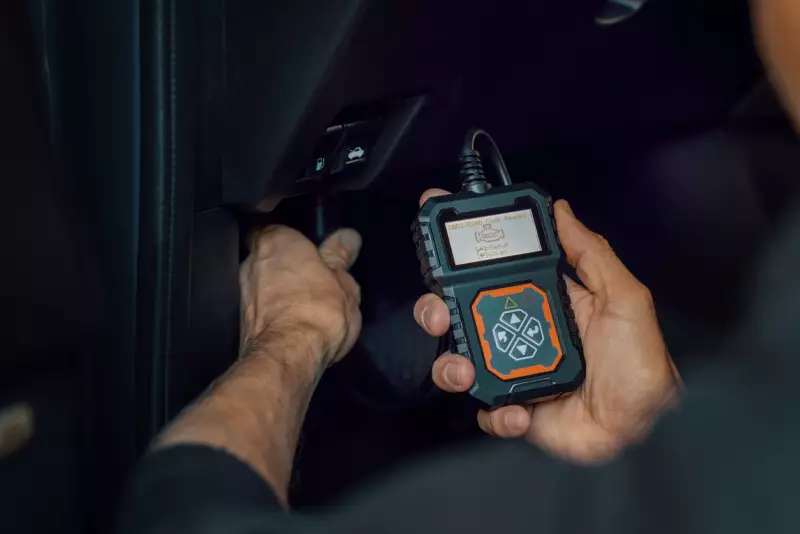
The OBD2 port is a 16-pin trapezoid connector located inside the passenger compartment, typically within three feet of the steering column, under the dashboard on the driver's side. Federal regulations require it to be accessible without tools.
If your vehicle is a 1996 model year or newer and was sold in the United States, it has an OBD2 port and is compatible with any standard OBD2 scanner. Pre-1996 vehicles used OBD1 systems that were not standardized; reading those requires vehicle-specific tools or adapters.
What Does an OBD2 Scanner Do?
The core function of an OBD2 scanner is communication with the vehicle's onboard computers. Modern vehicles contain dozens of electronic control modules managing everything from engine operation to transmission shifting to airbag deployment. The OBD2 system was originally designed to monitor emissions-related components, but its scope has expanded considerably, and many scanners can access systems well beyond the original emissions focus.
Read Diagnostic Trouble Codes (DTCs)
When a sensor detects a reading outside its expected range, the relevant control module stores a DTC and, in many cases, illuminates a warning light. DTCs follow a standardized format. A letter identifying the system (P for powertrain, B for body, C for chassis, U for network communication), followed by four digits that specify the fault. P0300, for example, indicates a random or multiple cylinder misfire. P0420 indicates catalyst system efficiency below threshold. A scanner retrieves these codes from the vehicle's memory.
Clear Diagnostic Trouble Codes
Once the underlying issue has been addressed, a scanner can clear stored DTCs and turn off the associated warning light. It is worth noting that clearing a code does not fix the problem; if the fault condition still exists, the code will return. Some codes require multiple drive cycles to reappear after clearing, which can temporarily mask a recurring problem.
Display Live Data Streams
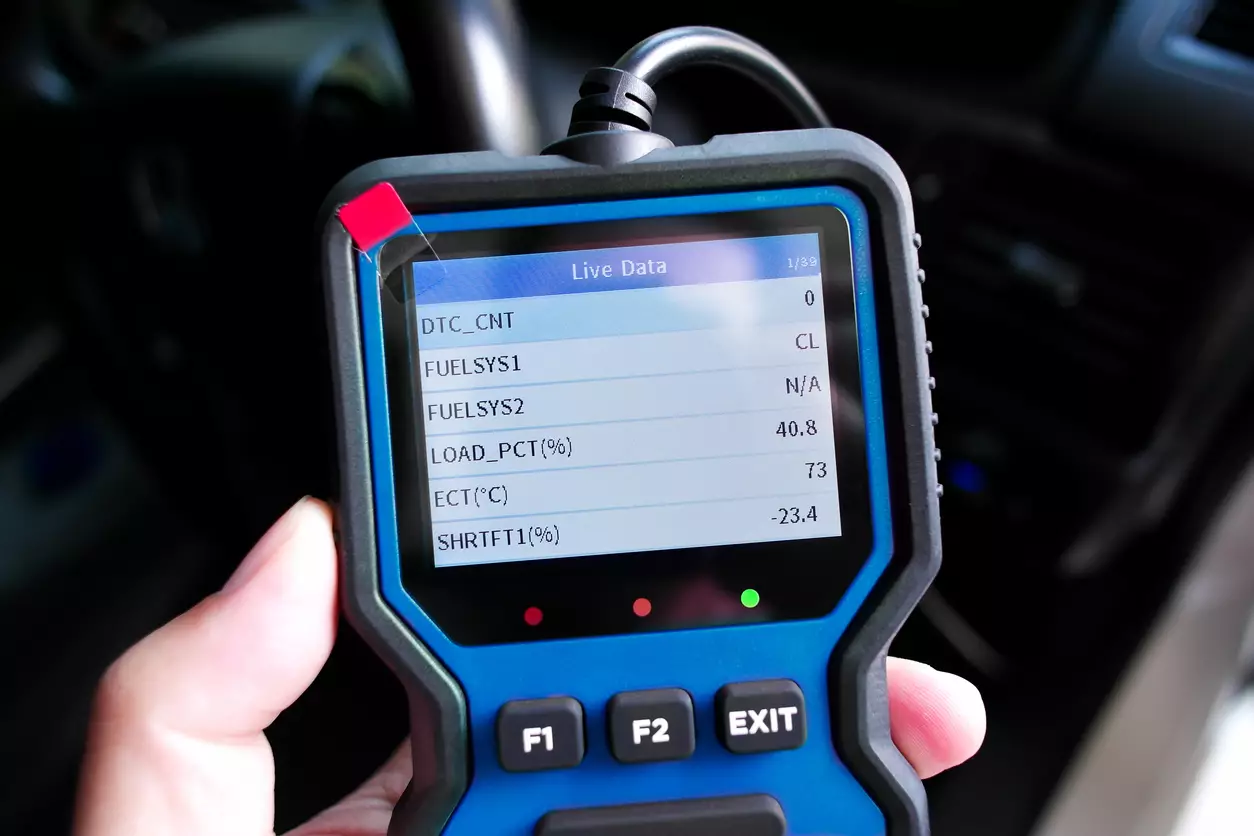
Most scanners beyond basic code readers can display real-time parameter data from the vehicle's sensors. This includes engine RPM, coolant temperature, intake air temperature, mass airflow, fuel trim values, oxygen sensor readings, vehicle speed, and many other parameters. Live data is invaluable for diagnosing intermittent faults and verifying that a repair actually corrected the underlying problem.
Freeze Frame Data
When a DTC is stored, the vehicle's computer also captures a snapshot of the operating conditions at the moment the fault was detected. This freeze frame data shows what the engine was doing (speed, load, temperature, fuel trim) when the fault occurred, which provides critical context for diagnosis.
Check I/M Readiness Monitors
OBD2 systems run a series of self-tests called readiness monitors on emissions-related components, including the catalytic converter, oxygen sensors, evaporative emissions system, EGR system, and others. When you clear codes or disconnect the battery, these monitors reset to incomplete.
Most states require the monitors to be complete before a vehicle can pass an emissions inspection. A scanner lets you check monitor status before taking the car for testing, avoiding a failed inspection from an incomplete monitor.
Access Vehicle Information
Scanners can retrieve the vehicle identification number (VIN), calibration IDs, and other identification data directly from the vehicle's computers, which is useful for verifying that the correct software is installed or for cross-referencing repair information.
How an OBD2 Scanner Works
When you plug a scanner into the OBD2 port, it connects to the vehicle's communication bus, the network that links all of the vehicle's electronic control modules. The scanner sends standardized request messages, and the relevant control modules respond with the requested data.
OBD2 supports several communication protocols, including CAN (Controller Area Network), ISO 9141-2, KWP2000, and SAE J1850. Modern vehicles predominantly use CAN, which became mandatory for all OBD2-compliant vehicles starting with the 2008 model year. A compliant OBD2 scanner handles all of these protocols automatically, detecting which one the vehicle uses and switching accordingly.
The standardized portion of OBD2 covers what are called generic or global OBD2 parameters. These are the emissions-related systems and the universal DTC library. Beyond the generic layer, manufacturers add their own enhanced or proprietary parameters, accessible only with tools that have manufacturer-specific software.
A generic scanner will read the universal codes; a scanner with enhanced coverage will read additional manufacturer-specific codes that provide more detail about what went wrong and where.
Bluetooth- and Wi-Fi-based OBD2 adapters work identically to wired scanners at the hardware level. They plug into the OBD2 port and communicate with the vehicle's bus the same way. The difference is that they transmit the data wirelessly to a smartphone or tablet running a diagnostic app, which handles the code lookup, data display, and user interface functions.
How to Use an OBD2 Scanner
Using a basic or mid-range OBD2 scanner is straightforward. The process takes a few minutes and requires no tools beyond the scanner itself.
- Locate the OBD2 port. Look under the dashboard on the driver's side, within reach of the steering column. It is a 16-pin trapezoid connector, usually black or grey. In most vehicles it is exposed and easy to spot; in some, it may be behind a small cover that pops open by hand.
- Turn the ignition to the "on" position. You do not need to start the engine for most functions. Turn the key or press the start button to the "on" or "accessory" position so the vehicle's electronics are powered. Some scanners require the engine to be running for live data functions.
- Plug in the scanner. Connect the scanner to the OBD2 port. It will click into place. The scanner should power on automatically; if it does not, check your ignition position.
- Allow the scanner to connect and identify the vehicle. Most scanners auto-detect the vehicle's communication protocol and VIN within a few seconds. Some units ask you to confirm or manually enter vehicle information.
- Select "Read Codes" or equivalent function. Navigate to the diagnostic code reading function on the scanner's menu. The scanner will query the vehicle's modules and display any stored DTCs. Write them down or photograph the screen for reference.
- Look up the codes. Every scanner includes a basic code description, but the description alone rarely tells you enough to diagnose the problem confidently. Cross-reference the codes with a repair database, your vehicle's service manual, or a reliable source specific to your vehicle model. Many codes have multiple possible causes, and the code points you toward a system, not a specific failed part.
- Check freeze-frame data if available. Review the freeze-frame snapshot to understand what the vehicle was doing when the fault was logged. This context often helps narrow down the likely cause.
- Clear the codes only after addressing the fault, or to verify a repair. If you have made a repair and want to confirm it resolved the issue, clear the codes and drive the vehicle through the conditions that originally triggered the fault. If the code returns, the repair was incomplete or incorrect.
For Bluetooth scanners used with a smartphone app, the process is the same through step 4. After the adapter connects, open your app, pair it with the adapter via Bluetooth or Wi-Fi, and use the app's interface to navigate code reading and live data functions.
Types of OBD2 Scanners
|
Type |
Price Range |
Key Capabilities |
Best For |
|
Basic code reader |
$20-$80 |
Read and clear generic DTC codes |
Everyday drivers who want to know why the check engine light is on |
|
Mid-range handheld scanner |
$80-$300 |
DTC codes, live data streams, freeze frame, I/M readiness |
DIY mechanics and drivers who service their own vehicles |
|
Bluetooth/app-based scanner |
$20-$150 |
DTC codes, live data via smartphone app; features vary by app |
Tech-comfortable drivers who want a low-profile tool with software flexibility |
|
Professional scan tool |
$500-$5,000+ |
Full system access, bidirectional controls, module programming, OEM-level data |
Professional technicians and shops requiring comprehensive vehicle access |
Basic Code Readers
A basic code reader does one thing reliably: it reads and clears generic OBD2 diagnostic trouble codes. Most have a small LCD screen that displays the DTC and a brief description, and a few buttons to navigate a simple menu.
They typically do not display live data, freeze frame information, or manufacturer-specific codes. For a driver who primarily wants to know why the check engine light came on, whether the issue is worth dealing with immediately, and whether it is safe to drive to the shop, a basic reader provides exactly that information. Prices start around $20 to $30 at major auto parts retailers.
Advanced Diagnostic Scanners
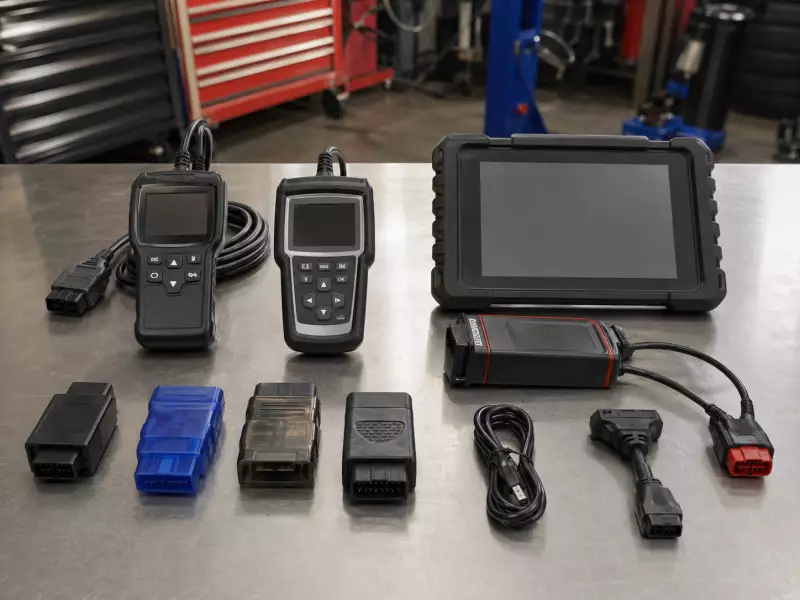
Mid-range handheld scanners add live data streaming, freeze frame capture, I/M readiness monitor status, and often enhanced code coverage for popular domestic and import brands. Higher-end units in this category include graphing functions for live data, O2 sensor testing, EVAP system testing, and the ability to read codes from ABS, SRS (airbag), and transmission modules in addition to the powertrain.
These tools are well-suited for the DIY mechanic who wants to diagnose problems thoroughly before deciding whether to tackle a repair or hand it to a professional. Prices typically range from $80 to $300.
Bluetooth and App-Based Scanners
Bluetooth and Wi-Fi OBD2 adapters pair with smartphone apps to perform the same functions as a handheld scanner, with the smartphone's screen serving as the display. The quality of the experience depends heavily on both the adapter hardware and the app.
Free apps provide basic code reading and clearing. Paid apps or subscription services add live data graphing, enhanced manufacturer coverage, emissions readiness, and in some cases advanced features like bidirectional testing.
The ELM327 chip standard is widely used in these adapters, though quality varies significantly among cheap clones. Established adapters from brands like Veepeak, BAFX, and OBDLink tend to be more reliable than no-name alternatives. Prices for the adapter range from $20 to $150.
Professional OBD2 Tools
Professional-grade scan tools used in dealerships and independent shops offer capabilities well beyond what generic OBD2 covers. These tools access all of a vehicle's control modules, including body, chassis, HVAC, power accessories, and advanced driver assistance systems.
They support bidirectional controls, which allow the technician to command actuators, cycle solenoids, and run component tests directly from the tool. They support module programming and software updates. OEM-level scan tools (manufacturer-specific tools like GM's Tech2, Ford's IDS, or BMW's ISTA) provide the deepest access to a specific brand's vehicles.
Aftermarket professional tools from Snap-on, Autel, Launch, and similar brands aim to cover multiple manufacturers with comparable depth. Prices start around $500 for capable professional tools and can reach several thousand dollars for top-tier platforms with comprehensive coverage subscriptions.
Benefits of Using an OBD2 Scanner
An OBD2 scanner does more than satisfy curiosity about a warning light; used consistently, it shifts the balance of information in your favor at every stage of vehicle ownership.
- Know what you are dealing with before talking to a shop. Walking into a dealership or independent shop with the DTC already in hand changes the conversation. You can research the code before you arrive, understand what systems are involved, and ask more informed questions. You are less likely to agree to unnecessary diagnosis fees or misrepresent the symptoms.
- Avoid unnecessary diagnostic fees. Many shops charge $100 to $150 just to connect a scanner and pull codes. For a straightforward fault that you can read yourself in two minutes, this fee represents pure overhead. A $50 scanner pays for itself the first time you use it to avoid an unnecessary shop visit.
- Catch problems early. Some DTCs are stored as pending codes before they trigger the check engine light. A scanner can reveal these developing faults before they become active, giving you time to address them before they affect performance or lead to additional damage.
- Verify repairs. After any repair involving an engine or emissions component, clearing the codes and confirming they do not return through a full drive cycle is the proper way to verify the fix worked. A scanner lets you do this yourself rather than relying solely on the shop's assurance.
- Check emissions readiness before inspection. In states with mandatory emissions testing, checking I/M readiness monitor status before showing up for the test saves the time and inconvenience of a failed inspection. If any monitors show as incomplete, you know you need more drive time before testing.
- Monitor vehicle health over time. Live data access lets you watch how key parameters behave under different driving conditions. Fuel trim values that are consistently high or low, an oxygen sensor that does not switch as expected, or coolant temperature that takes longer than usual to reach normal can all be spotted through regular monitoring before they produce a fault code.
Limitations of OBD2 Scanners
An OBD2 scanner is a powerful starting point for diagnosis, but understanding what it cannot do is just as important as knowing what it can.
- A code is not a diagnosis. This is the most important limitation to understand. A DTC tells you which system or sensor detected an anomaly. It does not tell you which specific component failed or why. P0420 (catalyst efficiency below threshold) could mean a failing catalytic converter, a bad oxygen sensor, an exhaust leak, or an engine burning oil. The code narrows the field; it does not close it. Interpreting codes accurately requires additional testing and knowledge of the vehicle.
- Generic scanners miss manufacturer-specific codes. The universal OBD2 DTC library covers emissions-related faults. Automakers supplement this with proprietary enhanced codes that are far more specific and numerous. A generic scanner reading a BMW might show a single generic powertrain code where a BMW-specific tool would show a more detailed manufacturer code pointing to the exact sensor or circuit involved.
- Some systems require specialized access. Airbag systems, ABS modules, transmission controllers, body electronics, and advanced driver assistance systems generate their own codes that basic OBD2 scanners may not access. A vehicle with an ABS warning light requires a scanner with ABS module access, which is not universal on entry-level tools.
- Live data requires interpretation. Real-time data streams are only useful if you know what normal values look like for the specific vehicle and operating condition. A fuel trim of +15% at idle may indicate a vacuum leak. An oxygen sensor that is not switching may indicate a lazy sensor or a rich/lean condition. Interpreting live data effectively requires familiarity with the parameters and their expected behavior.
- Clearing codes does not fix the underlying issue. This is both a limitation and a misuse risk. Clearing a code and hoping the problem resolves itself is not a repair strategy. If the fault condition persists, the code will return. In the meantime, you may have reset the I/M readiness monitors, which require a complete drive cycle to restore, and you have lost the freeze frame data that could have aided diagnosis.
FAQs
Can I use an OBD2 scanner on any car?
Any US-spec passenger car or light truck from the 1996 model year or newer is required to have an OBD2 system and will work with any compliant OBD2 scanner for generic code reading. Vehicles from 1994 and 1995 may be OBD2-equipped depending on the manufacturer, but compliance is not guaranteed.
Pre-1994 vehicles use non-standardized OBD1 systems that require vehicle-specific tools. Medium-duty trucks (8,500 to 14,000 lb GVWR) became OBD2-compliant for the 2005 model year. Heavy-duty trucks use a different diagnostic standard called HD-OBD, which requires different tools.
Do OBD2 scanners show all problems?
No. Standard OBD2 scanners reliably access emissions-related powertrain faults because those are the systems the OBD2 standard was designed to cover. Access to other vehicle systems, including ABS, airbags, transmission, HVAC, and body electronics, varies by scanner and vehicle.
Many problems do not generate a DTC at all. Mechanical wear, intermittent electrical faults that have not yet met the threshold for a stored code, worn brake pads, and physical damage to components are examples of issues that a scanner will not detect. An OBD2 scanner is a useful first step in diagnosing a concern, not a comprehensive vehicle health report.
Is it safe to clear error codes?
Clearing codes is safe in the sense that it does not damage the vehicle. However, it should be done thoughtfully. When you clear DTCs, you also erase freeze frame data and reset the I/M readiness monitors, which need to rerun their self-tests through a complete drive cycle. If you are trying to pass an emissions test, clearing codes shortly before the test will likely result in a failed inspection due to incomplete monitors. The appropriate time to clear codes is after making a repair, to verify that the fix resolved the issue and the code does not return.
Do I need technical knowledge to use one?
For basic code reading, no. Plugging in a scanner, reading the DTC, and looking up its general meaning is something any driver can do in a few minutes. Interpreting what the code means for your specific vehicle, deciding whether you can address it yourself or need a shop, and using live data effectively do require some familiarity with how engines and vehicle systems work. The good news is that most popular vehicle models have active online communities and forums where owners discuss common codes and their causes in plain language. Combining the DTC with a model-specific forum search often yields highly practical guidance.
Are OBD2 scanners worth it?
For most drivers who own vehicles they plan to keep for more than a year or two, yes. A basic code reader costs $20 to $30 and pays for itself the first time you avoid a $100 shop diagnostic fee to find out why the check engine light came on. A mid-range scanner with live data capability is a meaningful tool for anyone who does their own maintenance or wants to monitor vehicle health proactively. The main caveat is that a scanner is only as useful as your willingness to interpret what it shows. If your response to every Check Engine light is to hand the keys to the dealer regardless of the code, a scanner provides less incremental value.